

Convert PNG to Black and White
Turn your PNG photos into bold, high-contrast monochrome images instantly, right in your browser.
Powered by groupdocs.com and groupdocs.cloud.
By uploading your files or using our service you agree with our Terms of Service and Privacy Policy.

About the Black and White Tool
Convert your PNG images to black and white online in seconds - turn them into bold, high-contrast monochrome pictures with true black and white pixels rather than gray tones. Our free tool works directly with PNG files and keeps full quality.
Upload your PNG image, select Black and white from the color options, and preview it instantly. Add more PNG files to apply the same conversion across your whole batch, then download every result together.
All PNG processing happens locally in your browser, so your files never leave your device. It is completely free, needs no signup, and works on any platform.
PNG Black and White Tool in Action
Turn a color PNG photo into a classic black and white image in one click.
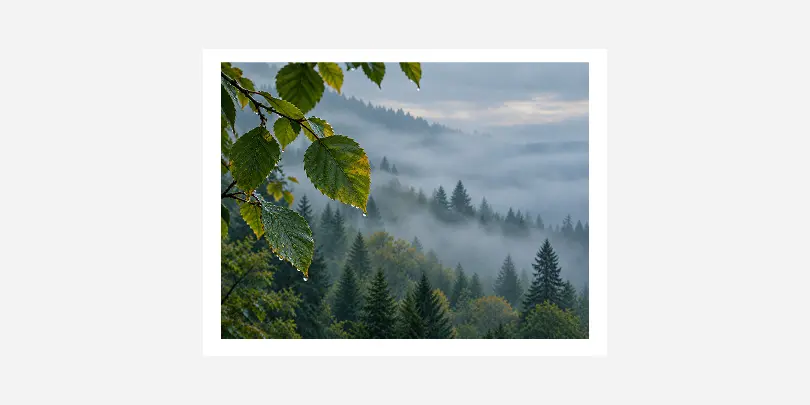 Before
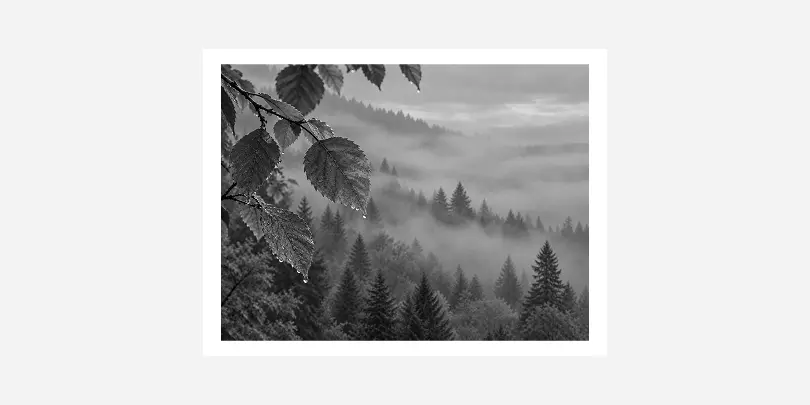 After
After
Black and White App Features
- Completely free to use, with no signup, watermarks, or hidden limits.
- Convert up to 30 images at once and download every result in a single batch.
- Everything happens right in your browser when you convert an image - your photos are never uploaded to a server.
- Uses dithering to produce true black and white pixels, not just a gray tint.
- Works with PNG, JPG, GIF, and WebP images, so you can convert almost any photo format.
Portable Network Graphic
Portable Network Graphics (PNG) stores raster images with lossless compression, preserving every pixel detail exactly. Unlike its predecessor GIF, PNG supports full alpha transparency and millions of colors, making it ideal for web graphics, logos, screenshots, and images requiring text overlays. Its patent-free design ensures broad compatibility across browsers and image editors.
How to Convert an Image to Black and White Online
Get a Better Black and White Result
Do
- Choose photos with strong contrast and clear shapes.
- Check the preview before downloading.
- Keep a copy of the original PNG file.
Avoid
- Using photos that are very dark or washed out.
- Converting images where color carries the meaning, like charts.
- Starting from a low-quality copy: use the original file.
Questions & Answers
-
How long does it take to convert a PNG image to black and white?Converting a PNG image takes just a second or two in most cases, since everything runs locally in your browser's JavaScript engine rather than being sent to a server. Larger files or a full batch of images may take a little longer, but you'll see progress update live as each one finishes.
-
Is it safe to convert my photos here?Yes. Your images are processed entirely on your own device using your browser's built-in canvas and Web Worker features, and they are never uploaded to a server or stored anywhere online. Once you close or refresh the page, nothing about your photos remains on our side.
-
What browser should I use?Any modern browser works well, including Chrome, Firefox, Edge, and Safari on both desktop and mobile devices. The tool relies only on standard, widely supported browser features, so there is nothing extra to install, enable, or configure.
-
What is the difference between black and white and grayscale?Grayscale keeps a full range of gray tones from black to white, similar to an old gray-toned photograph. Black and white uses dithering to reduce a PNG image to just pure black and white pixels, creating a bold, high-contrast, halftone-style look.
-
Will converting a PNG image to black and white reduce its quality?The conversion does reduce color information by design, since that is exactly what a black and white effect is meant to do. Beyond that, no resampling or compression is applied, so the image dimensions and sharpness are fully preserved.
Select a language
- العربية
- Български
- Català
- Čeština
- Dansk
- Deutsch
- Ελληνικά
-
English
- Español
- Eesti
- فارسی
- Suomi
- Français
- עברית
- हिन्दी
- Hrvatski
- Magyar
- Հայերեն
- Indonesia
- Italiano
- 日本語
- Ქართული
- Қазақ Тілі
- 한국어
- Lietuvių
- Latviešu
- Melayu
- Nederlands
- Polski
- Português
- Română
- Русский
- Slovenčina
- Slovenščina
- Svenska
- ไทย
- Türkçe
- Українська
- Tiếng Việt
- 中文(简体)
- 中文(繁體)